Adobe Flash Updated: 11 Vulnerabilities patched
Those using Flash Player desktop runtime for Windows and Macintosh can update to version 17.0.0.134.
Flash Player’s installed on Chrome, Internet Explorer and Windows 8.x will automatically update. The vulnerabilities affecting Windows and Macintosh users were given the most severe priority rating, which indicate the vulnerabilities are currently being targeted by attackers.
The fixes resolve memory corruption, type confusion, integer overflow, and use-after-free flaws, which all lead to code execution, in addition bugs that would allow for cross-domain policy bypass and file upload policy bypass.
Microsoft Patch Tuesday: Fourteen Security patches
Microsoft issued 14 security bulletins for March 2015, five of which are rated as critical. Among them is the security fix for FREAK (also known as the Factoring Attack on RSA-EXPORT Keys vulnerability or CVE-2015-0204) is the latest flaw to be found in SSL/TLS, and could allow unauthorized parties – such as malicious hackers or intelligence agencies – to spy upon your secure internet communications.
Source: Microsoft
Personal Mobile Devices with access to corporate networks should be secured
Your employees phone and or tablet more than likely has access to their corporate email account. In many cases they have access to corporate documents in the cloud or via VPN.
The simple act of enabling a password or PIN number on a phone can save you a tremendous amount of hassle. This is the simplest front line of defense. While people don’t deliberately forget their phone in a public restroom, gym, or restaurant, we all know it happens. So, make sure you have the appropriate device lock in place, either a pin code, or screen pattern lock. If you have a pattern lock (this is where you join the dots to unlock your phone) make sure you wipe the screen to avoid leaving smudges that can reveal your pattern. (We actually recommend not using a pattern lock for this reason).
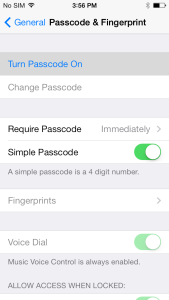 On iOs (Varies slightly by version) Click on Settings, General and Passcode Lock (you may have to scroll down a bit). This will bring you to the Passcode Lock menu, although if you already have a PIN or password set, you’ll have to input it first.
Turn Passcode On is the first and most tempting option here, but don’t click on it yet. First, you have to make a decision: Do you want a four-digit PIN, or a more complex alphanumeric password? If four digits suit you fine, ensure that Simple Password is turned on. If not, leave it off.
Although a PIN has fewer characters than a password, it’s generally just as hard for a casual thief to guess.
While a four-digit PIN has only 10,000 possible combinations, a long alphanumeric password of 10 or more digits that includes upper- and lowercase letters, numbers and punctuation marks will have trillions.
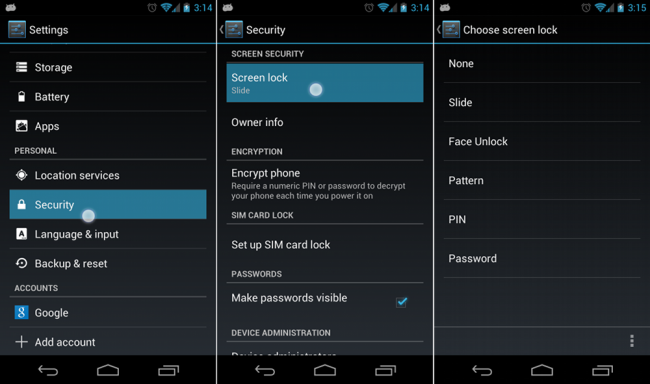 Android can be a bit more complex as there are an almost endless variety of devices with vendor specific “skins” and security settings. Generally however you will find a setting called Lock Screen under settings.
Important to note with Android; there are many lock screen replacements available and many include their own lock methods. There are programs that run and many can be circumvented more easily than the operating systems locks and their locks should be avoided.
Chrome 41 Released: 51 security fixes
Chrome 41 was released to channel for Windows, Mac and Linux on Tuesday, including 51 security fixes, many deemed high in severity.
Source: Chrome blog
FREAK fix for Apple devices due within a week for iOs and OSX
Apple has mentioned to multiple sources today that patches for their operating systems are in the works and should be released in under a week, possibly as early as Monday the 9th.
FREAK SSL flaw; Apple and Google prepare patches
Researchers have disclosed a new SSL/TLS vulnerability — the FREAK attack. The vulnerability allows attackers to intercept HTTPS connections between vulnerable clients and servers and force them to use ‘export-grade’ cryptography, which can then be decrypted or altered.
A connection is vulnerable if the server accepts RSA_EXPORT cipher suites and the client either offers an RSA_EXPORT suite or is using a version of OpenSSL that is vulnerable to CVE-2015-0204. Vulnerable clients include many Google and Apple devices (which use unpatched OpenSSL), a large number of embedded systems, and many other software products that use TLS behind the scenes without disabling the vulnerable cryptographic suites. A list of know affected domains is below.
Firefox 36: 17 Security fixes
Firefox 36 was released on Tuesday and a number of security fixes have been included, some deemed critical. Users should ensure they are running the latest version.
Source: Firefox
Superfish removal tool released by Lenovo
Lenovo has announced the release of a tool to remove Superfish. An adware program pre-installed on Lenovo’s consumer PCs, it leaves users vulnerable to attack. We have been contacting clients and removing the software, now users can remove it themselves with the download below:
Source: Lenovo
Phishing email circulating claiming to be from Microsoft Volume Licensing
A post on the Cisco Managed Threat Defense blog reports Emails that purport to come from the Microsoft Volume Licensing Service Center are circulating
This email will have a custom subject line and will look very similar to a real email from Microsoft. Clients should be very careful when receiving any VLSC emails while this is circulating.
Source: Cisco
Anthem warning of Phishing campaigns targeting exposed account holders
Last week Anthem Inc. warned that a breach of its network exposed the personal information of as many as 80 million people. This week they have posted a bulliten warning that scammers are sending phishing e-mailsto people whos onformation was stolen.
How to protect yourself against phishing:
- Be wary of emails asking for confidential information – especially information of a financial nature. Legitimate organizations will never request sensitive information via email
- Make sure you familiarise yourself with a website’s privacy policy. The majority of commercial websites have a privacy policy, which is usually accessible at the foot of the page. The most useful thing to look for is the website’s policy on whether it will or will not sell its mailing list.
- Watch out for generic-looking requests for information. Fraudulent emails are often not personalised, while authentic emails from your bank often reference an account you have with them. Many phishing emails begin with “Dear Sir/Madam”, and some come from a bank with which you don’t even have an account.
Source: Anthem
 capitalregionit